Getting Started
How it works
Prometheus uses stars to derive an analytical point spread function (PSF) for an image. It then fits the height and central coordinates of all stars simultaneously using the PSF.
The CCDData Object
This is the object type used for images and is based on the astropy CCDData type but has some additional capabilities that are needed for Prometheus.
from prometheus.ccdata import CCDData
image = CCDData(flux,error,mask=mask)
You can also read an image directly from a file.
from prometheus.ccdata import CCDData
image = CCDData.read('ccd1100.fits')
You can also write a CCDData object to file. This saves the flux, error, mask and sky (computed) to file.
image.write('outfile.fits')
CCDData objects have a sky image property. This can be set manually, but is calculated directly from the image using sep (Python and C library for Source Extraction and Photometry) package.
It also has a bounding box property (bbox) using the photutil BoundingBox class. This can be useful when you take a slice of an image because it will remember what the original coordinates were.
The PSF Model Object
There are currently three different analytical functions available in Prometheus: Gaussian, Moffat and Penny (Gaussian core and Lorentizn-like wings). Eventually an empirical look-up table option will also be available. There are separate classes for each type. You can instantiate an object directly using these classes or use the psfmodel() utility function.
# Create PSF model specific class
from prometheus.models import PSFGaussian,PSFMoffat,PSFPenny
psf = PSFGaussian([3.5,4.5,0.5])

# Create PSF model using psfmodel() utility function
The first PSF parameter is the height of the star. This means that the PSF is defined with a height of 1 (not a flux of 1). To get the flux you can use psf.flux() for height=1 or input a set of parameters psf.flux(pars) (only the height is used).
The Full Width at Half-Max (FWHM) can be easily obtained for any PSF type using psf.fwhm().
You can easily read and write a PSF to file.
# Write a PSF to a file
psf.write('mypsf.psf')

# Now read it in
from prometheus import models
newpsf = models.read('mypsf.psf')
You can fit a single star directly using the PSF.
# Fit a star in an image
initpars = [1000.0,5.6,15.6]  # height, xcen, ycen
outpars,model = psf.fit(image,initpars)
You can also subtract many stars from an image using the sub() method.
# Subtract all stars in a catalog from an image
subim = psf.sub(image,starcat)
To get a quick thumbnail of the PSF shape with psf().
psf = PSFGaussian([3.5,4.5,0.5])
plt.imshow( psf() )
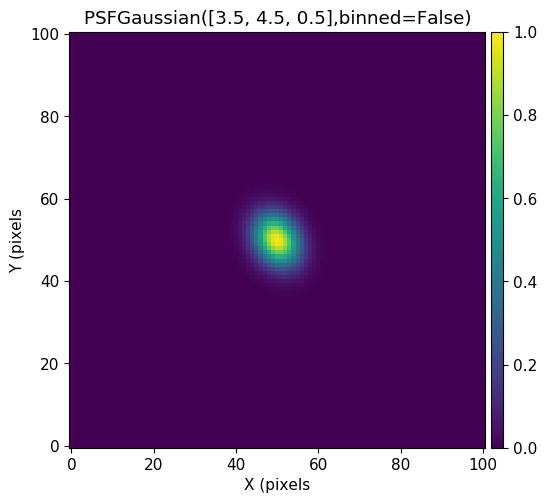
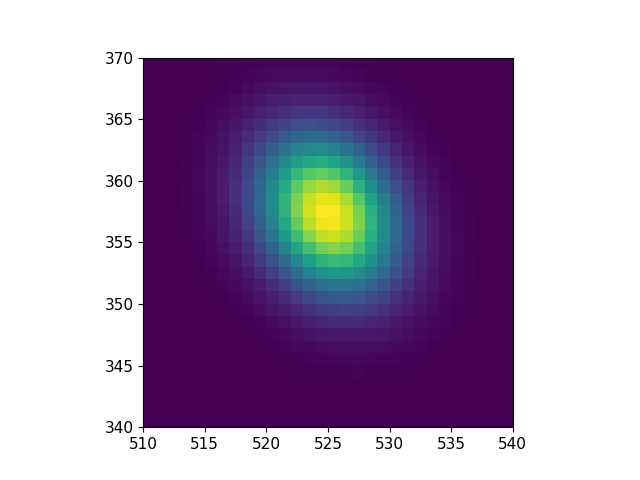
To use the PSF model you simply need to give it the parameters of the star (height, xcenter, ycenter) and the pixels you want the PSF to cover. You can either give the model
the X and Y pixel values (as 2D or 1D arrays),
a BoundingBox object, or
a range of X/Y pixel values [[x0,x1],[y0,y1]] (NOTE, x1 and y1 are not included).
# Generate a PSF for a star
psf = PSFGaussian([3.5,4.5,0.5])
model = psf(pars=[1000.0,524.5,356.8],bbox=[[510,540],[340,370]])
plt.imshow(model,origin='lower',extent=[510,539,340,369])
How to Fit Stars
Prometheus has three ways that you can fit stars.
Fit a single star with
psf.fit()Fit a group of overlapping stars with
groupfit.fit().fit all stars in an image with
allfit.fit().
They each need a PSF model, an image to fit, and an estimate for the stellar parameters (at least their x/y coordinates).
Let’s fit a single star:
psf = PSFGaussian([3.5,4.5,0.5])
initpars = [1000.0,54.0,148.0]
out,model = psf.fit(image,initpars)
Fit a group of stars:
psf = PSFGaussian([3.5,4.5,0.5])
# initcat must be a catalog with at least "x" and "y" columns
out,model = groupfit.fit(psf,image,initcat)
Fit all stars in an image:
psf = PSFGaussian([3.5,4.5,0.5])
# initcat must be a catalog with at least "x" and "y" columns
out,model = allfit.fit(psf,image,initcat)
The Important Modules
Prometheus has a number of useful modules.
modelscontains the various PSF models.detectioncan be used to detect sources usingseporphotutils.aperturemeasures aperture photometry.getpsfis used to fit the PSF for an image.groupfitcan be used to fit a group of overlapping data.allfitfits all stars in an image.prometheusruns through all steps for processing an image.synthcan be used to generate synthetic/fake images.